# Hadoop 2.2.0安装及配置
- URL: https://www.yidoo.xyz/hadoop-2-2-0-installation-and-configuration
- 作者: 核动力蜗牛
- 发布时间: 2013-10-29
- 更新时间: 2013-10-29
- 分类: 技术笔记
- 标签: bigdata, hadoop
# Pre-installation
保证所有主机上已经安装 JDK 1.6+和 ssh。
## 添加主机名到/etc/hosts
修改/etc/hosts
```bash
sudo vi /etc/hosts
```
添加
```bash
192.168.56.101 zhenlong-master
192.168.56.102 zhenlong-slave1
```
## 配置无密码的 ssh 连接
在所有主机上生成 ssh 的公钥和私钥
```bash
ssh-keygen -t rsa
```
在 master 主机上,生成 authorized_keys
```bash
cp ~/.ssh/id_rsa.pub ~/.ssh/authorized_keys
chmod 644 ~/.ssh/authorized_keys
```
,并 copy 到所有 slaves 的~/.ssh/目录。
# Installation
## Download Apache Hadoop
_Apache Hadoop:_
保证 master 和 slaves 上面的 hadoop 解压的相同的目录
## Set Environment Variables
```bash
export HADOOP_HOME=/home/hadoop/hadoop-2.2.0
export JAVA_HOME=/home/hadoop/jdk1.6.0_45
```
## Hadoop Configuration
修改 conf 文件夹下面的几个文件:
- core-site.xml
```xml
fs.default.name
hdfs://zhenlong-master:9000
hadoop.tmp.dir
/home/hadoop/hadoop_tmp/hadoop2
```
- hdfs-site.xml
```xml
dfs.namenode.name.dir
/home/hadoop/hadoop_dfs/hadoop2/name
Path on the local filesystem where the NameNode stores the namespace and transactions logs persistently.
dfs.datanode.data.dir
/home/hadoop/hadoop_dfs/hadoop2/data
Comma separated list of paths on the local filesystem of a DataNode where it should store its blocks.
dfs.permissions
false
```
- mapred-site.xml
```xml
mapreduce.framework.name
yarn
```
- yarn-site.xml
```xml
yarn.resourcemanager.resource-tracker.address
zhenlong-master:8031
host is the hostname of the resource manager and port is the port on which the NodeManagers contact the Resource Manager.
yarn.resourcemanager.scheduler.address
zhenlong-master:8030
host is the hostname of the resourcemanager and port is the port on which the Applications in the cluster talk to the Resource Manager.
yarn.resourcemanager.scheduler.class
org.apache.hadoop.yarn.server.resourcemanager.scheduler.capacity.CapacityScheduler
In case you do not want to use the default scheduler
yarn.resourcemanager.address
zhenlong-master:8032
the host is the hostname of the ResourceManager and the port is the port on which the clients can talk to the Resource Manager.
yarn.nodemanager.local-dirs
${hadoop.tmp.dir}/nodemanager/local
the local directories used by the nodemanager
yarn.nodemanager.address
0.0.0.0:8034
the nodemanagers bind to this port
yarn.nodemanager.remote-app-log-dir
${hadoop.tmp.dir}/nodemanager/remote
directory on hdfs where the application logs are moved to
yarn.nodemanager.log-dirs
${hadoop.tmp.dir}/nodemanager/logs
the directories used by Nodemanagers as log directories
yarn.nodemanager.aux-services
mapreduce_shuffle
yarn.nodemanager.aux-services.mapreduce.shuffle.class
org.apache.hadoop.mapred.ShuffleHandler
```
- slaves
```
zhenlong-slave1
```
- hadoop-env.sh
```bash
export JAVA_HOME=/home/hadoop/jdk1.6.0_45
```
此处 JAVA_HOME 可以根据每天 Server 情况设定。
## 格式化 NameNode
第一次启动,需要先格式化 NameNode。
```bash
hadoop namenode -format
```
## Start Hadoop
```bash
~/hadoop-2.2.0/sbin/start-all.sh
```
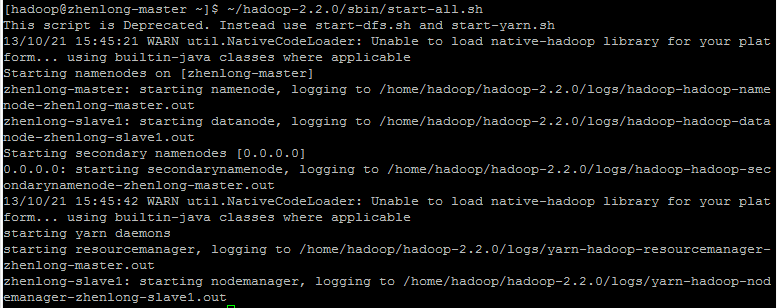
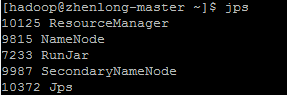
- In master
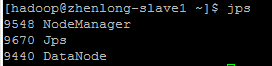
- In slaves
# Test
- HDFS Web UI: http://zhenlong-master:50070
- YARN Web UI: http://zhenlong-master:8088
- YARN && MapReduce 测试:
```bash
~/hadoop-2.2.0/bin/hadoop jar ~/hadoop-2.2.0/share/hadoop/mapreduce/hadoop-mapreduce-examples-2.2.0.jar wordcount file wordcount_out
```
